Multi-node SurrealDB requires shared distributed storage - a backend that every query node can reach with transactional consistency. A single RocksDB file on one server (or one Kubernetes pod) is not a multi-node cluster; it is the single-node, on-disk model.
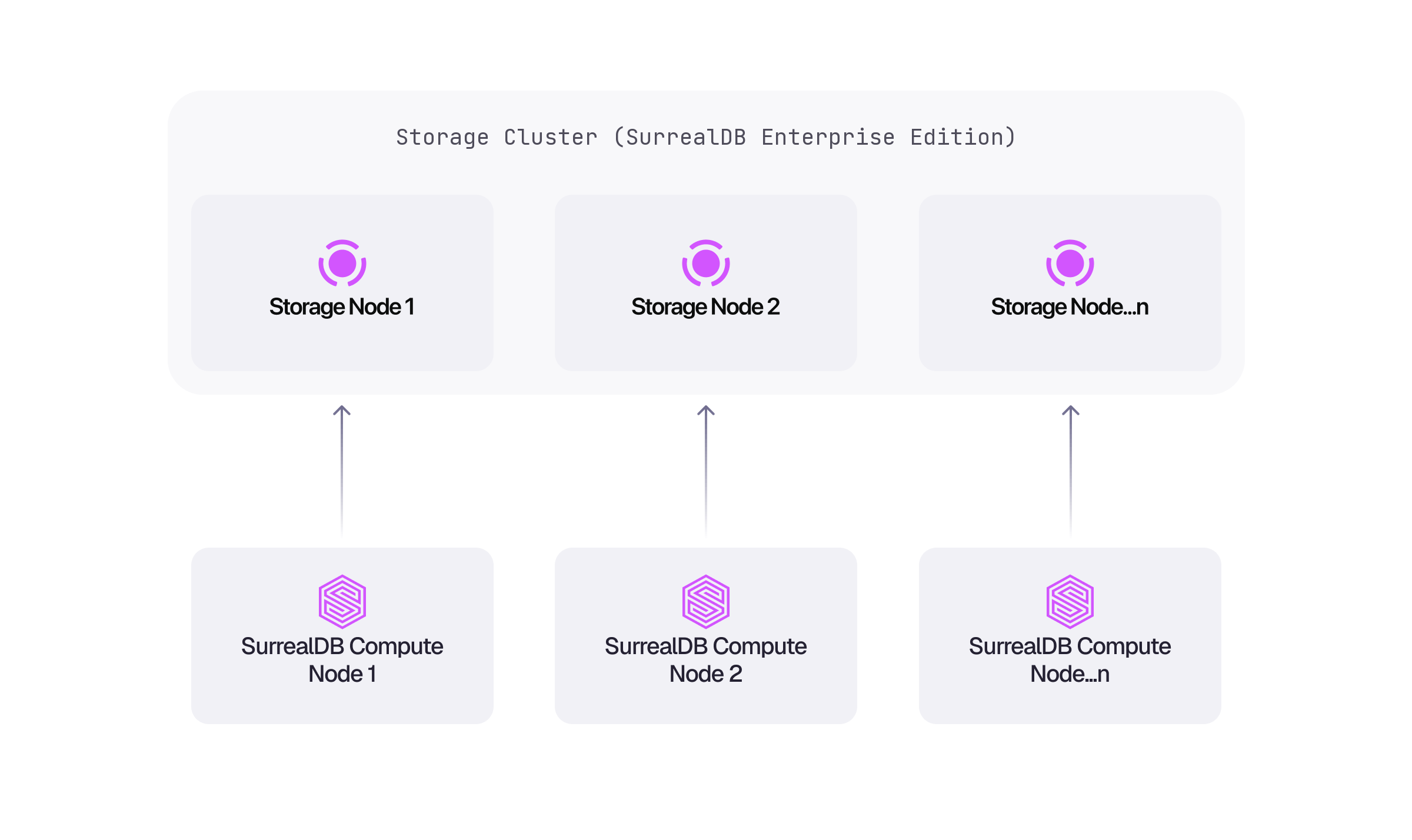
Because compute and storage are separate layers, query nodes hold no data of their own. Every node reads and writes through the same storage cluster, so nodes can join or leave without data being redistributed, and that is what makes horizontal scaling and high availability possible.
Managed clusters
The Scale plan on managed instances runs multi-node clusters on distributed storage with replication and consensus. SurrealDB operates the storage layer, so a cluster is provisioned and resized from the Cloud dashboard, or from a script with surrealctl.
Self-hosted clusters
SurrealDB Enterprise covers self-hosted multi-node clusters, and ships the Kubernetes operator and runbooks for running the storage layer yourself. See Managed Kubernetes for how this maps onto Amazon EKS, Google GKE, and Azure AKS.
Single-node deployments
Where one node is enough, file-backed storage covers an on-disk server, and Deploy on Kubernetes covers a single SurrealDB pod with RocksDB on a persistent volume. Deployment models compares the options side by side.
For the flags accepted when starting a server, see the surreal start reference.